Coding Startup: Java
Showing posts with label Java. Show all posts

Simple Java Program | Some Facts That Nobody Told You - CodingStartup

Code Startup


In This Topic:

In this topic, we will be covering some basic and advance details about Simple Java Program, Some Facts That Nobody Told You. Moreover , we will be covering the vision of looking to a programming language. As a result, you will also increase you knowledge about that java programming language.

Simple Java Program article is also helpful in interview purpose. The points which I am considering that will make you understand that how to understand a programming language. If you are new this site and wanted to learn full java then you must watch this Java Programing Course

Java code explained line by line

To explain this code, I will be considering for-instance of program. Firstly, we will have look on a basic java program structure. Last but not the least, we will we discussing about the some points in that simple java program structure. So lets have for-instance of a code and then we will discussing some points.

class CodingStartUp
{
   public static void main (String args[])
    {
    }
}

Now, in the above code, we have just written a simple code in which we define class, method, data types , array and some keywords which are pre-define in java. Now Lets talk about one by one.

What is Class in java ?

Class is user defined map or blueprint that in which objects are created. In other words, class is place where we can create or set some properties of some group by creating objects. Objects are nothing that have some properties like place ,thing or a name of person.

In the above, code we define class like this

class CodingStartUp

Here class is keyword and after that space, the class name which user has to decide.Before deciding name, there are some condition while selecting the name of program or name of class. Firstly, the first letter should be capital always if there is a single word. Secondly, If there are two or more words you cannot give space but you can use underscore like this Coding_start_up and if you don't want to use underscore then you can follow this standard CodingStartUp. Thirdly,and most importantly, you can not use space in any case while selecting the name.

What is public static void main (String args[]) in java ?

what is public static void main in java

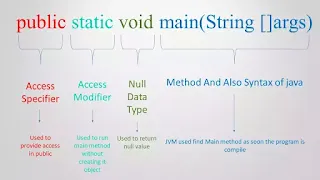
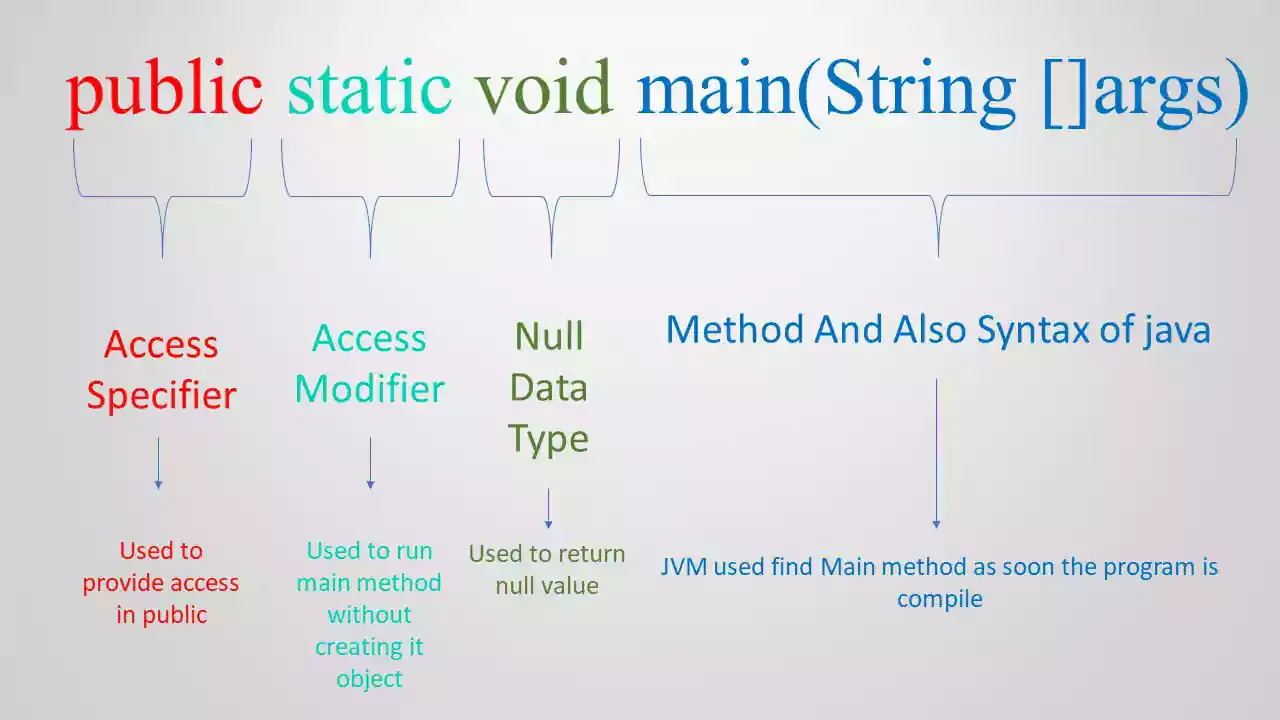
 After considering the first line of code , now we will be considering second line. In second line, we got public static void main (String args[]) what it means, why we use it.

First one is public, it is a pre-defined keyword and access specifier. Access specifier is an term which we use to define access range of class and method. Now the Question arises that How many access specifier are in java? There are total Four access specifier i.e Default, Public, Private and Protected. Now here only, we will be talking about Public access specifier. Public access specifier define by its name only that everyone can you and from everywhere like public transport. Now, we will discuss it why main method is public in java?

why main method is public in java?

We use public access specifier only because main method is an entry point for running a program in JVM. To access the program details which we have written should accessible to JVM so that we use public with main. Now we will talk about Static.

What is Static modifier and use in java code ?

As the Question tells that Static is modifier and pre-define keyword. It is assign for the management of the object memory. In other words, Static is used for object memory management. Now, The question arises that What is the use of it? Static means that on creation of an object. This means that when we create a method in java we have to create its instance (object). While using main method we also have to create object in java for using it. If we create, then ambiguity we be create. So to avoid that we use static modifier that will run code without creating an object.

What is void in java ?

Void is a data type which give no return value. We are using void with main method because this method does not give any return value. Now, That is the reason we use void with main method.

What is String []args in java ?

Now, Here String []args is parameter for the main function. This parameter comes with two section words i.e String and [] args. String is data type and also a pre-define class in java. [] args is an array with the name called args. We can use other names which we want to but we should use [] these brackets because it define array. We can also use these bracket after name declaration like this String codingstartup[]. String []args is used in main method for passing command line args while running a program. Now One question came to our mind that Why we use String data type in main method in java?

Why we use String data type in main method in java?

As we Know that Java is comes from C and C++. In C and C++, We can declare int in main method and it accepts that. The reason behind this is that C and C++ are both directly connected OS. While passing int parameter it will return value to OS. That are only two value i.e exit code and exit status. These values help to tell that program have successfully ended or error terminated. After getting these codes, OS will cleans up the process that is allocated to task. When exit code return 0 that means code has been successfully run without ant error. On another hand, non zero status tells about the error or problem.

In Java, we know that JVM runs the code in main thread and no direct interaction between OS and our code. Moreover, There is no direct link in resource and memory allocation between program and OS. JVM is directly connected to the hardware. Then JVM complete the work of main method by sending status of exit code and exit status with the help of one lib i.e java.lang.Runtime.exit. Moreover, if you want full explanation you can visit this site Why we use String data type in main method in java?

Conclusion

On the ending note, I would like to say that java language is a puzzle. More you you solving it , more you getting about it. This from my side. I hope you like to read my article and you get alot of knowledge from this article.

Pascal's Triangle in java

Code Startup

Pascal's Triangle in java.


100% Working Code and Projects.


if you need any help about project and Application Contact Shelly at:+917888361589.


Java Code Given Below:-


public class Pattern {

    public static void main(String[] Abheer) {
        int  abheer = 1;

        for(int i = 0; i <7; i++) {
            for(int space = 1; space < 7 - i; ++space) {
                System.out.print("  ");
            }

            for(int j = 0; j <= i; j++) {
                if (j == 0 || i == 0)
{
                    abheer = 1;
 }               else{
                    abheer = abheer * (i - j + 1) / j;
}
                System.out.printf("%4d", abheer);
            }

            System.out.println();
        }
    }
}

Output:-

               1
             1   1
           1   2   1
         1   3   3   1
       1   4   6   4   1
     1   5  10  10   5   1
   1   6  15  20  15   6   1


Floyd's Triangle in java

Code Startup

Floyd's Triangle in java


100% Working Code and Projects.


if you need any help about project and Application Contact Shelly at:+917888361589.


Java Code Given Below:-

public class Pattern {

    public static void main(String[] Abheer) {
        int  number = 1;

        for(int i = 1; i <= 5; i++) {

            for(int j = 1; j <= i; j++) {
                System.out.print(number + " ");
                ++number;
            }

            System.out.println();
        }
    }
}


Output :-
1
2 3
4 5 6
7 8 9 10
11 12 13 14 15

Full Pyramid using @ in java

Code Startup

Full Pyramid using @ in java.

100% Working Code and Projects.


if you need any help about project and Application Contact Shelly at:+917888361589.


Java Code Given Below:-

public class Pattern {

    public static void main(String[] Abheer) {
        int  k = 0;

        for(int i = 1; i <=5; ++i,k=0) {
            for(int space = 1; space <= 5 - i; ++space) {
                System.out.print("  ");
            }

            while(k != 2 * i - 1) {
                System.out.print("@ ");
                ++k;
            }

            System.out.println();
        }
    }
}


Output :-
                 @
             @ @ @
        @ @ @ @ @
    @ @ @ @ @ @ @
@ @ @ @ @ @ @ @ @


Inverted Half Pyramid using @

Code Startup

Inverted Half Pyramid using @

100% Working Code and Projects.


if you need any help about project and Application Contact Shelly at:+917888361589.


Java Code Given Below:-

public class Pattern {

    public static void main(String[] Abheer) {
    

        for(int i =5; i >= 1; --i) {
            for(int j = 1; j <= i; ++j) {
                System.out.print("@ ");
            }
            System.out.println();
        }
    }
}

Output:-

@ @ @ @ @
@ @ @ @
@ @ @
@ @
@

Explanation :-

 First,Two Loop we are using for rows and second loop is for column . Second, we are using first loop in reverse to invert the pattern.

Half Pyramid using numbers in java

Code Startup

Half Pyramid using numbers in java

100% Working Code and Projects.


if you need any help about project and Application Contact Shelly at:+917888361589.


Java Code Given Below:-


public class Pattern 
{
    public static void main(String[] args) 
{        
        for(int i = 1; i <=5; ++i) 
{
            for(int j = 1; j <= i; ++j) 
{
                System.out.print(i + " ");
            }
            System.out.println();
        }
    }
}


Output:-

1
2 2
3 3 3
4 4 4 4
5 5 5 5 5


Explanation :-

In First Loop we are using for rows and second loop is for column . Second, We have use the value of i variable for printing the number


Half Pyramid using @ in java

Code Startup

Half Pyramid using "@" in java

100% Working Code and Projects.


if you need any help about project and Application Contact Shelly at:+917888361589.


Java Code Given Below:-

public class Pattern
{
    public static void main(String []Abheer)
{
        for(int i = 1; i <=5; ++i)
{
            for(int j = 1; j <= i; ++j) 
{
                System.out.print("@ ");
            }
            System.out.println();
        }
    }
}

Output :-
@
@ @
@ @ @
@ @ @ @
@ @ @ @ @


Explanation :-

In First Loop we are using for rows and second loop is for column .


For Loop in Java

Code Startup

For Loop in Java.

100% Working Code and Projects.


if you need any help about project and Application Contact Shelly at:+917888361589.


Java Code given below:-

package CodingStartupAbheer;

import java.util.Scanner;

public class ForLoop {

    public static void main(String Abheer[]) {
        Scanner S = new Scanner(System.in);
        System.out.println("Enter the name");
        String a = S.next();
        System.out.println("How many times you want to print");
        int b=S.nextInt();
        for (int i=1;i<=b;i++)
        {
            System.out.println(a);
        }
    }
}


Output :-

Enter the name
CodingStartup
How many times you want to print
4
CodingStartup
CodingStartup
CodingStartup
CodingStartup


Explanation:-

In this loop, 1) we initialize the value 
2) give the condition 
3) we increment the value
this will work only when the condition is true. when the condition get false it will stop executing the code.


While Loop in Java.

Code Startup

While Loop in Java.

100% Working Code and Projects.


if you need any help about project and Application Contact Shelly at:+917888361589.


Java Code given below:-


package CodingStartupAbheer;

import java.util.Scanner;

public class WhileLoop {

    public static void main(String Abheer[]) {
        Scanner s = new Scanner(System.in);
        System.out.println("Enter your name");
        String a = s.nextLine();
        System.out.println("How many times yo want to print name");
        int q = s.nextInt();
        int i = 1;
        while (i <= q) {
            System.out.println(a);
            i++;
        }

    }

}


Output:-

Enter your name
Abheer
How many times yo want to print name
2
Abheer
Abheer


Explanation:-

In this loop, firstly the condition will be checked then it will execute the inner statement in the blocks. The drawback of Do While loop is over come in this loop.


Do While Loop in Java.

Code Startup

Do While Loop in Java.

100% Working Code and Projects.


if you need any help about project and Application Contact Shelly at:+917888361589.


Java Code Below :-

package CodingStartupAbheer;

import java.util.Scanner;

public class DoWhile {

    public static void main (String Abheer[])
    {
        Scanner a= new Scanner(System.in);
        
        System.out.println("Enter your name");
        String c= a.nextLine();
        System.out.println("How many times you want to print your name");
        int b=a.nextInt();
        int i=1;
        do
        {
            System.out.println(c);
             i++;
        }while(i<=b);
               
    }
}


Output:-

Enter your name
Coding Startup
How many times you want to print your name
3
Coding Startup
Coding Startup
Coding Startup

Explanation:-

This is a first loop which was invented. In this loop, first it will execute the main part that have to be executed then it will check the condition. In this once the statement or that part will be executed whether the condition is true ore not. if the condition is true then it will work properly.


Switch Case in Java.

Code Startup

Switch Case in Java.

100% Working Code and Projects.


if you need any help about project and Application Contact Shelly at:+917888361589.


Java Code :-

package CodingStartupAbheer;

import java.util.Scanner;

public class SwitchCase {
    public static void main (String []Abheer)
    {
        Scanner Abheer1= new Scanner(System.in);
        System.out.println("Enter number from 1 to 7");
        int a= Abheer1.nextInt();
        switch (a)
        {
            case 1:
                System.out.println("Sunday");
                break;
            case 2:
                System.out.println("Monday");
                break;
            case 3:
                System.out.println("Tuesday");
                break;
            case 4:
                System.out.println("Wednesday");
                break;
            case 5:
                System.out.println("Thursday");
                break;
            case 6:
                System.out.println("Friday");
                break;
            case 7:
                System.out.println("Saturday");
                break;
            default:
                System.out.println("Not Valid number");
                break;
        }
        
    }

}

Output :-


Enter number from 1 to 7
7
Saturday


Explanation :-

 In this program, when we enter number from 1 to 7 then it will directly jump to that case and execute that code which is inside the that case or block.


Nested Else If Statements in Java.

Code Startup

Nested Else If  Statements in Java.


100% Working Code and Projects.


if you need any help about project and Application Contact Shelly at:+917888361589.


Java Code Given below :-

package abheer;

public class NestedIfelse {
    public static void main(String args[])
    {
        int English=40;
        int Maths=70;
        int Total=70;
        if(Total>45)
        {
            if(Maths>60)
            {
                if(English>60)
                {
                    System.out.println("Mobile");
                }
                else{
                System.out.println("Cycle");
            }
            }
            else
            {
                System.out.println("No Cycle");
            }
            
        }
        else
        {
            System.out.println("nothing");
        }
        
    }

}

Output :-

Cycle


Explanation:-
                                 In this program, we are using if else statement within the if else statement. Now, in this , there will be more than one condition and every condition will be checked. If one condition gets false than that else part of that if statement will be executed. if first condition gets false then nothing will executed except else part of that if. 


Else If ladder Statements in Java.

Code Startup

Else If ladder Statements in Java.


100% Working Code and Projects.


if you need any help about project and Application Contact Shelly at:+917888361589.

Java code below :-

package CodingStartupAbheer;

import java.util.Scanner;

public class ElseIfLadder {

    public static void main(String[] Abheer) {
        Scanner Abheer1 = new Scanner(System.in);
        System.out.println("Enter the marks of English");
        int English = Abheer1.nextInt();
        System.out.println("Enter the marks of maths");
        int Maths = Abheer1.nextInt();
        int Total = English + Maths;
        if (Total < 90 && Total >= 100) {
            System.out.println("Grade is A");
        } else if(Total >80 && Total<=90)  {
            System.out.println("Grade is B");
        }else if(Total>70 && Total<=80)
        {
            System.out.println("Grade is C");
        }else if(Total>60 && Total<=70)
        {
            System.out.println("Grade is D");
        }else
        {
            System.out.println("Fail");
        }
    }

}


Output : 

Enter the marks of English
80
Enter the marks of maths
90
Grade is B


Explanation :-
                                     In this , if one condition is true then the statements inside that condition will be executed. if all the condition get false then the else part will be executed. 


Control Statement in Java.

Code Startup

Control Statement in Java.


100% Working Code and Projects.


if you need any help about project and Application Contact Shelly at:+917888361589.

Control Statements :-

                                                              Control Statements are the statements which are used to take some decision by the machine. Moreover it take decision that whether the code or statements should be executed or not.

1) if statement :-

                                   In this, the code inside the if statement will be executed only when the condition is true. 

Syntax :

if(condition){

//code to be executed

}
                             

See the code below :-

Java Code  :-

package CodingStartupAbheer;
import java.util.Scanner;
public class IfStatement {    
public static void main(String[] Abheer) {        
Scanner Abheer1 = new Scanner(System.in);        
System.out.println("Enter any number ");        
int a = Abheer1.nextInt();
        int b = Abheer1.nextInt();
        if (a > b) {
            System.out.println("A is larger");
        } 
    }

}


Output 1 :-

Enter any number 
9
Enter any number 
2
A is larger

Output 2 :-

Enter any number 
1
Enter any number 
5

Explanation :-

                                In first output, first number is larger than second number so that's why it gives the answer that A is larger. But in second output it does not give any output because condition is false that's why it does not print any output. To overcome this , if else is created.

2) if-else statement :-

                                        In this , if the condition is true then code which is inside the If column will be executed otherwise else part will be executed.

Syntax :-  

if(condition){

//code if condition is true

}else{

//code if condition is false

}

Java Code  :-

package CodingStartupAbheer;

import java.util.Scanner;

public class IfStatement {

    public static void main(String[] Abheer) {
        Scanner Abheer1 = new Scanner(System.in);
        System.out.println("Enter any number ");
        int a = Abheer1.nextInt();
        System.out.println("Enter any number ");
        int b = Abheer1.nextInt();
        if (a > b) {
            System.out.println("A is larger");
        } else {
            System.out.println("B is larger");
        }
    }

}

Output 1:-

Enter any number 
12
Enter any number 
34
B is larger

Output 2:-

Enter any number 
45
Enter any number 
12
A is larger


Runtime value in Java.

Code Startup

How to give the Value on Runtime in Java.

100% Working Code and Projects.

if you need any help about project and Application Contact Shelly at:+917888361589.


See the code below :-

Java Code  :-
package CodingStartupAbheer;

import java.util.Scanner;

public class ScannerClass {

    public static void main(String[] Abheer) {
        Scanner q = new Scanner(System.in);
        System.out.println("Enter any number");
        int a = q.nextInt();
        System.out.println("Enter any number");
        int b = q.nextInt();
        System.out.println("Enter your name");

        String Abheer1=q.next();
        int c = a + b;
        int d = a - b;
        int e = a * b;
        int f = a / b;
        int g = a % b;
        System.out.println(Abheer1);
        System.out.println("The Addition of two number you have entered is : " + c);
        System.out.println("The Subtraction of two number you have entered is : " + d);
        System.out.println("The Multiplication of two number you have entered is : " + e);
        System.out.println("The Division of two number you have entered is : " + f);
        System.out.println("The Modulas of two number you have entered is : " + g);
    }
}


Output :-

Enter any number
12
Enter any number
12
Enter your name
Abheer
Abheer
The Addition of two number you have entered is : 24
The Subtraction of two number you have entered is : 0
The Multiplication of two number you have entered is : 144
The Division of two number you have entered is : 1
The Modulas of two number you have entered is : 0


Explanation :-

                                        Here we use Scanner class of java to get the value on runtime.
Now in "Scanner q= new Scanner (System.in);" here 'q' is object name , 'new' is keyword which s use to allocate the memory to the object which is declared, 'System.in ' in this System is class which contains some coding and 'in' is object which helps to take the value on runtime.
Now, q.nextInt is used to define that we taking Integer value and from this we can get the value on runtime. Moving ahead, q.next() is used to take in String input on runtime. 


Calculation in Java in Command Line.

Code Startup

How to perform Calculation in Java in Command Line.

100% Working Code and Projects.

if you need any help about project and Application Contact Shelly at:+917888361589.


See the code below :-

Java Code  :-
class Calculation
{
public static void main(String []Abheer)
{
int a= Integer.parseInt(Abheer[0]);
int b= Integer.parseInt(Abheer[1]);
int c=a+b;
int d=a-b;
System.out.println("The sum of two number is :"+c);
System.out.println("The Subtraction of two number is :"+d);
}
}


Output :-


Explanation :-

                                       In this, we have use Integer.parseInt(Abheer[0]) just to convert the string value to Integer value because it cannot be converted itself.


Calculation in Java program.

Code Startup

How to perform Calculation in Java program.

100% Working Code and Projects.

if you need any help about project and Application Contact Shelly at:+917888361589.


See the code below :-

Java Code  :-

class Calculation
{
public static void main(String []Abheer)
{
int a=12;
int b=12;
int c=a+b;
int d=a-b;
int e=a*b;
System.out.println("The Addition of two number is :"+c);

System.out.println("The Subtraction of two number is :"+d);

System.out.println("The Multiplication of two number is :"+e); }
}


Output :-

The Addition  of two number is :12
The Subtraction of two number is :0
The Multiplication of two number is :144


Explanation :-
                                      In this , int is a data type and a,b,c,d,e are variables which store some value. Now System.out.println() is use to print the data and message on the output window and here we use '+' to join the message and value which has to print.


How to print message in command line arguments

Code Startup

How to Print Message in Command Line Arguments

100% Working Code and Projects.

if you need any help about project and Application Contact Shelly at:+917888361589.


See the code below :-

Java Code 1 :-

public class Hello {

    public static void main(String[] abheer) {
        System.out.println(abheer[0]);
       
   }

}

 
Explanation :- 
                                    In this, we have to give the value to program before running the program but after the compilation. This code will only run in cmd(Command Prompt) .

Java Code 2 :-

public class Hello {

    public static void main(String[] abheer) {
        System.out.println(abheer[0]);
     
   }

}


Explanation :- 
                                    As the program stores the data in the form of array. Now in this only the first word is printing and after space it is not recognizing. The value Abheer is stored in abheer[0] and abheer is not geting any memory.


Java Code 3 :-

public class Hello {

    public static void main(String[] abheer) {
        System.out.println(abheer[0]);
         System.out.println(abheer[1]);
     
   }

}


Explanation :- 
                                     In this program, the both value are geting memory. Moreover , we are using System.out.println() that's why its printing the value in next line.


How to Print Message in Java

Code Startup

How to Print Message in Java


100% Working Code and Projects.if you need any help about project and Application Contact Shelly at:+917888361589.

See the code below :-

Java Code :-

public class Hello {

    public static void main(String[] args) {
        System.out.println("Hello ");
        System.out.print("How are you ? ");
    }

}


Explanation :-

In first line, we have declared the class name which is public. Public is an access specifier which means that we can access it from any where.


In Second line,


  Public
 Access Specifier which can used any where again .
  Static
 Value or data remain unchanged  throughout the program.
  Void
A data type which does not contain any thing or null.
  Main
A function which is entry gate of any java program.
 String
It is a most flexible data type in java.
[] args
It is used because java program is store in array . it is not compulsory that we have to use args we can take any name or variable.


In third line, System is a class which call the another class which is PrintStream.java and that contains the two method which is println() and print(). Out is a object and println() is a method


Now the difference between println and print is that println() will print the message in next line and print() will print the message in the same line.


Output :-
Hello
How are you ? BUILD SUCCESSFUL (total time: 2 seconds)